archive / 2009–2013
Harvesting Twitter Search Results for Analysis using Python & SQL Server
Twitter. It's informative. It's time-wasting. It's useful. It's entertaining. It's important. It's drinking-from-the-fire-hose. It's everywhere.
It's Data. Realtime, Social, Contextual Data.
I Repeat; Real-time. Data. Sh*tloads of it.
A service unlike any we've ever had before, and yes, very different and much faster than the traditional internet. We've seen it used as a tool for social activism, a platform for change, as well as a real-time news stream in a way that old-school media just can't play. The thing about drinking from the firehose is, well, just that. Overwhelming data and no real easy way to capture it all in a format that you can easily use. There is simply too much shit happening every second to utilize properly. So, if you want to do any real trending, data mining, post-processing, or simple analysis on it - you really need to be making a historical record of what you're looking for and store it in a usable way. The Twitter search function only goes back so far (at least from what I've found), so for the vast majority of data (aka anything you'd want to do some long-term trending on) - when its gone, its gone (for easy public consumption, at least). Anyone who has been reading this blog over the past month or so, has seen my Metallica stuff - and yes, honestly, I wrote this script in order to add some data to that project. I wanted to chart mentions of the bands name, and member names - analyze them at a later date and try to draw some conclusions (as well as pretty visualizations).
But none of that is possible without the actual DATA first. So, let's go get some "tweet harvesting" started.
[box type="alert"]Disclaimer: This is pretty quick and dirty - but for 99% of cases it's perfect (possibly even overkill). Want to make it better? Go ahead, man! You are the master of your own destiny.[/box] So the question is, "How do we grab stuff from the timeline in the first place?" My answer, as it always is - Python, the world's best Swiss army knife for data. Enter my trusty Python 2.7 (32-bit to not break all sorts of modules). If you don't already have it, you can download it here. They have flavors for whatever you favorite OS is, but in this case I'm going to be using Windows and SQL Server, if you use OS X or Linux, you'd have to rewrite the SQL statements and connect syntax to use MySQL (which isn't a big deal, the rest would work fine as-is). Once python is installed you need 2 more modules for this to work:
- The pymssql module - available in binary installer from here (use version 2.0 or higher and compiled for Python 2.7 / Win32) (great site for pre-compiled win32 modules, by the way).
- The easy_install module - available in binary installer from here.
- Twitter API Module Twython - best way I've found is to use the easy_install setup tools we installed earlier. Open a windows command shell prompt (in Administrator Mode if in Win 7 / Vista) go to the *C:\Python27\Scripts* directory and type "easy_install twython" (no quotes). Easy.
Now that our Python installation is all sexed up like a fresh bowl of Kraft Macaroni and Cheese, we can worry about the database. Did I say "worry"? Nah, no worries - keep your pants on and keep you wallet in them, muchacho. The free SQL Server Express Edition works wonders for this type of shiz - and you can download it here. The 32-bit or 64-bit version should work fine for this. [box type="note"]Obviously, regular licensed versions of SQL Server work fine too, as well as SQL Server 2012 (Express or not) - but for the sake of actually getting it to work the first time (and not being on a RC release), I recommend 2008 R2.[/box] When you DO install it, just make sure that you use "mixed-mode" authentication - since we're going to use a hardcoded user - none of that pesky "Windows Autentication" shit - AND install it as the "Default Instance" NOT a "Named Instance". You see what I mean as it walks you through the process.
Setting up your SQL Server table structure
now we've got a fresh and spanky SQL Server installation - we need to set up some database tables to hold all our Tweets. "A table to hold my tweets", Hmm, sounds like a sad new-wave children's story... Anyways... First we need to make a new database. Log into your installation by using the SQL Server Management Studio app (as the 'sa' user, who you created a password for earlier), right-click on the "Databases" folder and go to "New Database". Name whatever you want, just remember that you'll have change my script to match. The defaults are fine in the creation. Once its created, click "New Query" in the upper left bar. Go to the query window and type "user [TweetHarvester]" (or [PinkyWinky], or whatever the hell you called your database) Now we are ready to make some tables, here is the structure that I used for my script. [cc lang="sql"] ---main tweet table SET ANSI_NULLS ON GO SET QUOTED_IDENTIFIER ON GO SET ANSI_PADDING ON GO CREATE TABLE [dbo].[TweetBank]( [tweet_id] [bigint] NOT NULL, [tweet_datetime] [datetime] NULL, [tweet_keyword] varchar NULL, [tweet] varchar NULL, [tweeter] varchar NULL, [lang] varchar NULL, [geo] varchar NULL, CONSTRAINT [PK_TweetBank] PRIMARY KEY CLUSTERED ( [tweet_id] ASC )WITH (PAD_INDEX = OFF, STATISTICS_NORECOMPUTE = OFF, IGNORE_DUP_KEY = OFF, ALLOW_ROW_LOCKS = ON, ALLOW_PAGE_LOCKS = ON) ON [PRIMARY] ) ON [PRIMARY] TEXTIMAGE_ON [PRIMARY] GO SET ANSI_PADDING OFF GO --temp tweet table (see below) SET ANSI_NULLS ON GO SET QUOTED_IDENTIFIER ON GO SET ANSI_PADDING ON GO CREATE TABLE [dbo].[TweetBankTemp]( [tweet_id] [bigint] NOT NULL, [tweet_datetime] [datetime] NULL, [tweet_keyword] varchar NULL, [tweet] varchar NULL, [tweeter] varchar NULL, [lang] varchar NULL ) ON [PRIMARY] TEXTIMAGE_ON [PRIMARY] GO SET ANSI_PADDING OFF GO --a tweet run logging table (for fun) SET ANSI_NULLS ON GO SET QUOTED_IDENTIFIER ON GO SET ANSI_PADDING ON GO CREATE TABLE [dbo].[TweetLog]( [RunId] [int] IDENTITY(1,1) NOT NULL, [BatchId] [int] NULL, [RunDate] [datetime] NULL, [Keyword] varchar NULL, [HarvestedThisRun] [int] NULL, [TotalHarvested] [int] NULL, CONSTRAINT [PK_TweetLog] PRIMARY KEY CLUSTERED ( [RunId] ASC )WITH (PAD_INDEX = OFF, STATISTICS_NORECOMPUTE = OFF, IGNORE_DUP_KEY = OFF, ALLOW_ROW_LOCKS = ON, ALLOW_PAGE_LOCKS = ON) ON [PRIMARY] ) ON [PRIMARY] GO SET ANSI_PADDING OFF GO [/cc] Go ahead and [ilink style="download" url="../uploads/sql_tables.sql"]Download[/ilink] this if you aren't the Cut-n-Paste type.
We are making 3 tables here:
- The actual table to hold the historical tweets going forward
- A "Temp Tweet" table exactly like the "real" table, in order to
easilylazily filter out dupes - A Log table in order to capture what has happened on each run. Because, lets face it - stats are fun
Before we go any further, we need to figure out what we're going to track...
In my case, as I said earlier, I'm tracking Metallica tweets (which includes the names of all past and present members), so my script has an array of all of those keywords and will iterate over them one at a time. [cc lang="python"] harvest_list = ['metallica', 'james hetfield', 'lars ulrich', 'kirk hammett', 'rob trujillo', 'jason newsted', 'cliff burton'] [/cc] Ok, enough foreplay - here is the actual script that does all the work. Notice that I commented the shit out of it, hope that helps. [cc lang="python"] from twython import Twython import string, json, pprint import urllib from datetime import timedelta from datetime import date from time import * import string, os, sys, subprocess, time
probably wasteful imports, but in this case, who cares?
import pymssql conn = pymssql.connect(host='localhost', user='notsa', password='notsayly', database='TallicaTweets') cur = conn.cursor()
connect to our database and create a cursor to do some work
harvest_list = ['metallica', 'james hetfield', 'lars ulrich', 'kirk hammett', 'rob trujillo', 'jason newsted', 'cliff burton']
my aforementioned harvest list, use as many as you want,
they will all be separated in the database by keyword
cur.execute("select max(isnull(batchid,0)) from tweetlog") batch_id_cur = cur.fetchall()
updated 3-8-2012
if batch_id_cur[0][0] is None: batch_id = 0 else: batch_id = batch_id_cur[0][0]+1
grabbing the last "batch id", if it exists so we
can make log entries that make SOME sense
for tweet_keyword in harvest_list: # for each keyword, do some shit cur.execute("""delete from tweetbanktemp where tweet_keyword = '"""+str(tweet_keyword)+"""'""") conn.commit()
whack the temp table in case we didn't exit cleanly
twitter = Twython() search_results = twitter.searchTwitter(q=tweet_keyword, rpp="100")
our search for the current keyword
#pp = pprint.PrettyPrinter(indent=3)
uncomment for debugging and displaying pretty output
for tweet in search_results["results"]:
some me the tweet, jerry!
print " Tweet from @%s Date: %s" % (tweet['from_user'].encode('utf-8'),tweet['created_at']) print " ",tweet['text'].encode('utf-8'),"\n" try:
lets try to to put each tweet in our temp table for now
cur.execute("""insert into TweetBankTemp (tweet_id, tweet_datetime, tweet_keyword, tweet, tweeter, lang) values ('"""+str(tweet['id_str'].encode('utf-8').replace("'","''").replace(';',''))+"""', cast(substring('"""+str(tweet['created_at'].encode('utf-8'))+"""',5,21) as datetime), '"""+str(tweet_keyword)+"""', '"""+str(tweet['text'].encode('utf-8').replace("'","''").replace(';',''))+"""', '"""+str(tweet['from_user'].encode('utf-8').replace("'","''").replace(';',''))+"""', '"""+str(tweet['iso_language_code'].encode('utf-8').replace("'","''").replace(';',''))+"""' ) """) except: print "############### Unexpected error:", sys.exc_info()[0], "##################################"
just in case something heinous happens we don't lose
ALL the tweets in this run, just the error one
cur.execute("""insert into tweetbank (tweet_id, tweet_datetime, tweet_keyword, tweet, tweeter, lang) select * from tweetbanktemp where tweet_id NOT in (select distinct tweet_id from tweetbank)""")
take all the tweets that we DIDNT already have
and put them in the REAL tweet table
cur.execute("""delete from tweetbanktemp where tweet_keyword = '"""+str(tweet_keyword)+"""'""")
take all THESE out of the temp table to not
interfere with the next keyword
cur.execute("""insert into tweetlog (BatchId, keyword, RunDate, HarvestedThisRun, TotalHarvested) values ( '"""+str(batch_id)+"""', '"""+str(tweet_keyword)+"""', getdate(), ((select count(*) from tweetbank where tweet_keyword = '"""+str(tweet_keyword)+"""')-(select top 1 isnull(TotalHarvested,0) from tweetlog where keyword = '"""+str(tweet_keyword)+"""' order by RunDate desc)), (select count(*) from tweetbank where tweet_keyword = '"""+str(tweet_keyword)+"""') )""")
add a record to the log table saying what we did!
conn.commit()
hot soup!
[/cc]
Go ahead and [ilink style="download" url="../uploads/harvester_of_tweets.py"]Download[/ilink] this if you aren't the Cut-n-Paste type.
[box type="alert"]Disclaimer #2: I take no responsibility if this code ends up eating your grandmother's birthday photos, makes your Shih Tzu sick, or causes you to forget about those Jethro Tull tickets you've been sitting on. It probably won't do most of those things, but still![/box]
Probably could have been done MUCH more efficiently - but I'm all about results, and for a project like this. Quick wins. Set it up to run every 5 minutes in the background using Task Scheduler and suddenly we're off to the races gathering tweets.
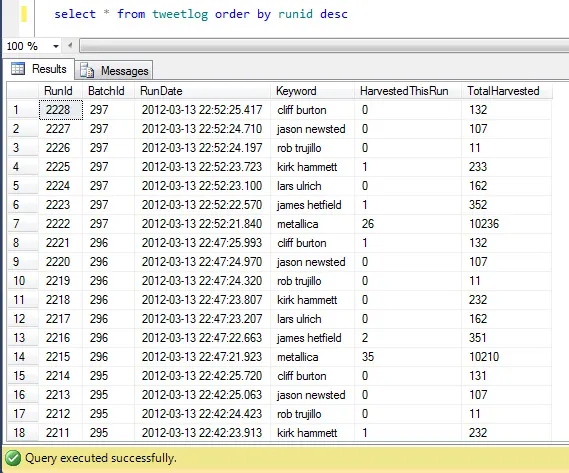 Pic of my "TweetLog" Table.
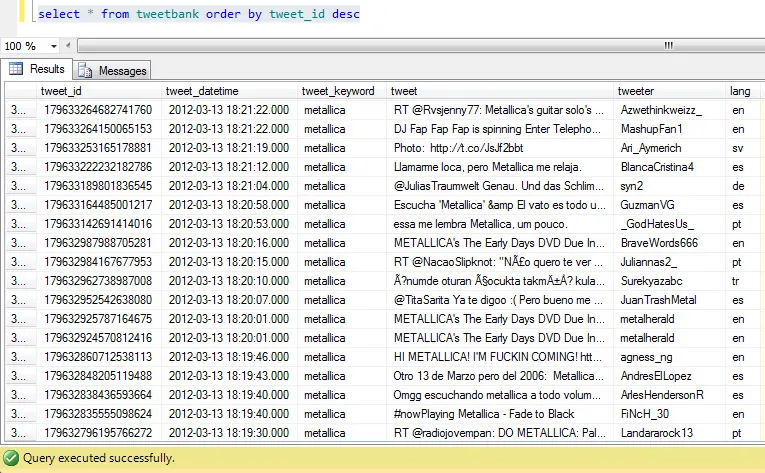 Pic of my "TweetBank" table.
What do we DO with this data? Well, that'll have to wait a bit while I gather it - but I sense some Tableau in the future...
Would love feedback, especially if you got it working (or if you didn't, maybe I can help).
Pic of my "TweetBank" table.
What do we DO with this data? Well, that'll have to wait a bit while I gather it - but I sense some Tableau in the future...
Would love feedback, especially if you got it working (or if you didn't, maybe I can help).